AI Lead Gen
Turn website visits into solar leads with a quick quote and a first design your team can review.

What is AI Lead Gen?
AI Lead Gen helps you capture and qualify solar leads directly from your website or landing page.
- Collect project and customer details upfront
- Generate an initial AI design your team can review and refine
- Automatically create projects in OpenSolar for follow-up
Every submission arrives with the information your team needs to review, qualify, and take the next step.
Why Pros choose AI Lead Gen

Capture customer details and an initial AI design so your team has more to work with than a basic form fill.

Give customers a quick first look based on their property details and the equipment you install.

Turn early interest into qualified opportunities with clear paths to a quote, proposal, or purchase.
How it works
Create the flow in OpenSolar, choose your fields, products, templates, and CTA, then add it to your website or landing page.
They enter the address, usage, and contact details, draw the roof when needed, or can upload a bill so usage and customer details can be pulled in automatically.
The lead, selections, energy profile, and design are created as a project in OpenSolar so your team can review, refine, follow up, or share a proposal.
What comes with AI Lead Gen?

Add AI Lead Gen to your website or landing page with embeddable code.

Capture address, usage, contact details, optional fields, roof input, and bill uploads based on how you want the flow set up.

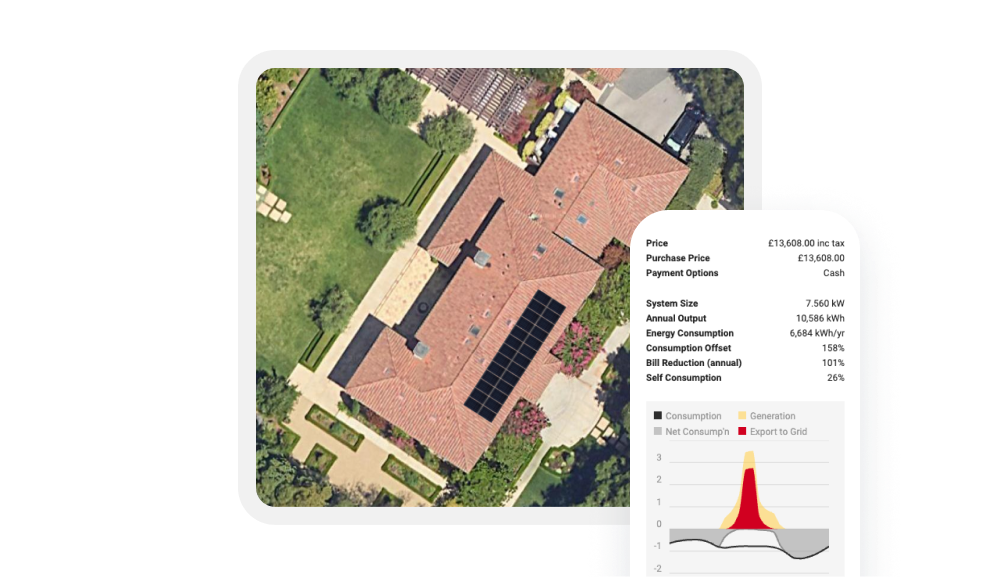
Show system visuals, recommended options, pricing, savings, and next steps based on the customer’s property details.

Give your team a first design to review and refine instead of starting from scratch.

Choose product paths, templates, CTA options, pricing display approach, imagery settings, and service area limits.

Send submitted leads, selections, and available design data into OpenSolar so your team can follow up, share a proposal, or guide the customer to checkout.
FAQs
It adds a solar lead flow to your website or landing page so customers can work through a quick estimate, see an initial design, and submit their details into OpenSolar.
The flow can capture address, usage, contact details, roof input, and optional fields. It can also support bill upload so usage details can be pulled in automatically.
The flow uses the available inputs to generate a preliminary design and estimate experience with configured system options and next steps.
The form works as a standard lead capture flow. The customer submits their details and sees the configured confirmation message instead of a proposal.
Yes. You can configure fields, product paths, templates, pricing approach, imagery, CTA behavior, and geography limits. Need more customization? Get in touch.
Yes. You set up the design templates, so the estimate only shows the equipment and options you want to offer. If you do not want to show exact equipment or pricing up front, you can keep those details hidden and use the estimate to start the conversation.