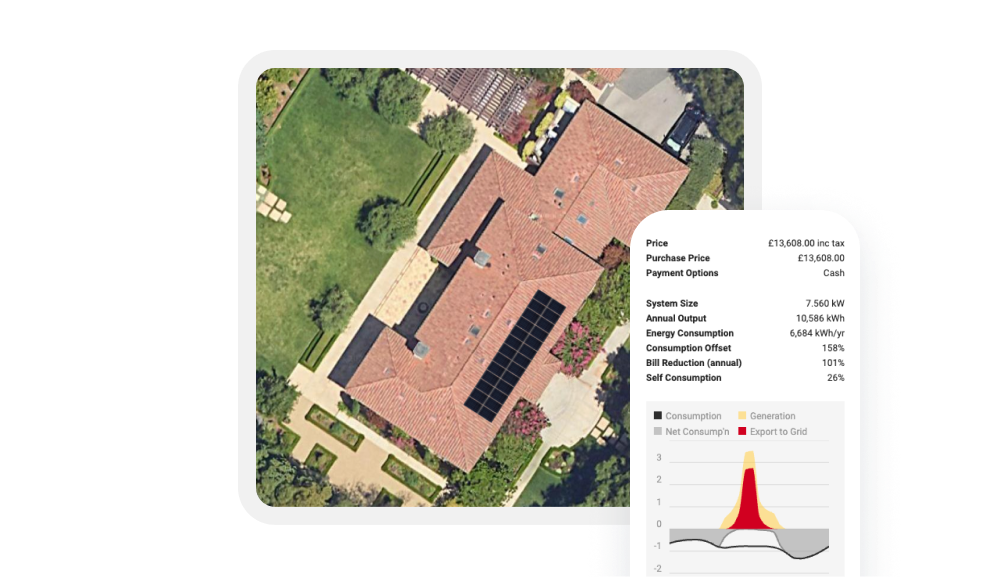
Auto Mounting Designer
Ada automatically calculates the amount of racking equipment you’ll need for the job, right down to the clamp.

Choose from a wide range of integrated racking providers for your project
Ada automatically calculates the compatibility of a racking product with roof type, slope, panel dimensions and spacing, and makes sure you’ve chosen the right kit.

Get an automatically generated and completely accurate bill of materials
Ada will produce a structural and wind loading assessment, and a full bill of materials containing all of the required quantities of rails, anchors, clamps and screws. In just a click or two, these can be ordered through our hardware shop, ensuring that you always have the right kit, and you’re managing your stock efficiently


- United States
- Racking & Mounting Systems

- Australia
- United Kingdom
- Batteries
- Inverters

- Australia
- Germany
- Ireland
- Italy
- Netherlands
- Spain
- United Kingdom
- Batteries

- Australia
- New Zealand
- Batteries

- Australia
- Heat Pump
- Other Components

- Australia
- Modules

- Australia
- Modules

- Australia
- Batteries
- Inverters

- Australia
- Heat Pump

- Australia
- Heat Pump

- Australia
- United Kingdom
- Inverters

- Spain
- United Kingdom
- Batteries
- Inverters

- Australia
- New Zealand
- Modules

- Australia
- United Kingdom
- United States
- Batteries
- Inverters

- United States
- Vanuatu
- Modules

- United Kingdom
- Batteries
- Inverters

- United Kingdom
- Modules

- United Kingdom
- Modules

- United States
- Batteries
- Power Storage

- Australia
- Fiji
- New Zealand
- Solomon Islands
- Vanuatu
- Modules

- Australia
- Germany
- Ireland
- Italy
- New Zealand
- Spain
- Sweden
- United Kingdom
- Inverters

- Australia
- Modules

- Australia
- Batteries
- Inverters

- Australia
- Inverters

- Germany
- United Kingdom
- Batteries
- Inverters

- United Kingdom
- Batteries
- EV Chargers
- Inverters

- Philippines
- Distribution

- Australia
- New Zealand
- Philippines
- Batteries
- Inverters

- Australia
- Batteries
- Inverters

- Australia
- Batteries
- Inverters

- United Kingdom
- Batteries

- Australia
- United Kingdom
- Batteries
- Inverters

- Australia
- Ireland
- United Kingdom
- Batteries
- Inverters

- Australia
- New Zealand
- Connect & Monitor
- Other Components

- United States
- Racking & Mounting Systems

- North America
- Batteries
- Inverters

- North America
- Racking & Mounting Systems

- Australia
- United States
- Batteries

- Canada
- United States
- Batteries
- Inverters

- Australia
- Modules

- Australia
- Batteries
- Inverters

- Australia
- Batteries
- Inverters

- Australia
- Batteries

- Australia
- Ireland
- New Zealand
- United Kingdom
- Batteries
- Inverters
- Other Components
- System Monitoring

- Australia
- New Zealand
- Modules
- Solar Carport

- Australia
- Canada
- Mexico
- New Zealand
- United States
- Batteries
- Inverters
- Modules

- Australia
- New Zealand
- Batteries

- Australia
- New Zealand
- Batteries

- Australia
- Batteries

- United States
- Permitting

- United States
- Finance

- Australia
- Finance

- Australia
- Finance

- United Kingdom
- Finance

- Australia
- New Zealand
- United Kingdom
- Finance

- Australia
- Finance

- United Kingdom
- Finance

- United States
- Finance

- United States
- Finance

- United States
- Finance

- Other Components

- United States
- Other Components
- Racking & Mounting Systems

- United States
- Other Components
- Racking & Mounting Systems

- Australia
- Batteries
- Inverters
- Modules

- Australia
- Training

- Australia
- New Zealand
- United States
- Modules

- Australia
- New Zealand
- Modules

- Australia
- United Kingdom
- Modules

- Belgium
- Germany
- Netherlands
- Poland
- United Kingdom
- Other Components
- Racking & Mounting Systems

- Australia
- Modules

- Australia
- Inverters

- United Kingdom
- Distribution

- Australia
- Batteries
- Inverters
- Modules

- United States
- Finance

- Australia
- New Zealand
- Batteries
- Inverters
- Other Components

- Australia
- New Zealand
- United States
- Other Components

- Sweden
- Batteries
- Connect & Monitor
- Distribution
- EV Chargers
- Inverters

- Australia
- Finance

- Australia
- New Zealand
- Modules

- Australia
- New Zealand
- Modules

- Australia
- Batteries
- Inverters

- South Africa
- Batteries
- Inverters

- Australia
- Ireland
- United Kingdom
- Batteries
- Inverters

- Australia
- New Zealand
- Inverters

- France
- Batteries
- Heat Pump
- Inverters
- Modules

- Australia
- New Zealand
- Modules

- Australia
- Philippines
- United Kingdom
- Batteries
- Inverters

- Netherlands
- Spain
- Sweden
- Lead services
- Other Components

- Australia
- Battery optimization
- Other Components
- Retail Energy
- Tariffs

- Australia
- New Zealand
- Batteries
- Modules

- Modules

- Australia
- Modules

- Germany
- Netherlands
- Poland
- Spain
- United Kingdom
- Racking & Mounting Systems

- Australia
- Batteries
- EV Chargers
- Inverters
- Modules

- Australia
- United States
- Modules

- Australia
- Batteries
- Inverters

- United States
- Other Components

- Australia
- EV Chargers
- Other Components

- Australia
- Batteries
- Inverters

- Australia
- Ireland
- New Zealand
- South Africa
- Sweden
- United Kingdom
- United States
- EV Chargers
- Inverters
- Other Components

- United Kingdom
- Batteries
- Inverters
- Modules

- Australia
- New Zealand
- Modules

- Australia
- New Zealand
- Modules

- United Kingdom
- Battery & Inverter Cover

- Australia
- United Kingdom
- Batteries
- Inverters

- United Kingdom
- Racking & Mounting Systems

- Australia
- Heat Pump

- United Kingdom
- Other Components

- Germany
- Batteries
- Distribution
- Inverters
- Modules

- Australia
- Batteries
- Modules

- Australia
- Poland
- United Kingdom
- Modules

- United Kingdom
- Inverters

- Australia
- Modules

- Australia
- Batteries
- Inverters

- United Kingdom
- Batteries
- Inverters

- Australia
- Batteries
- Inverters

- Australia
- Batteries
- Inverters

- Global
- Business Services

- Global
- Business Services

- Global
- Business Services

- United Kingdom
- Finance

- United Kingdom
- Finance